
While working in a file or supplement, users can change and/or apply filters based on how they want results to display. Default filters are automatically applied within the Supplements tab and Trades tab. This article explains how to change and apply filters.
Supplement Filter Feature
From the Supplements tab, select the filter icon. 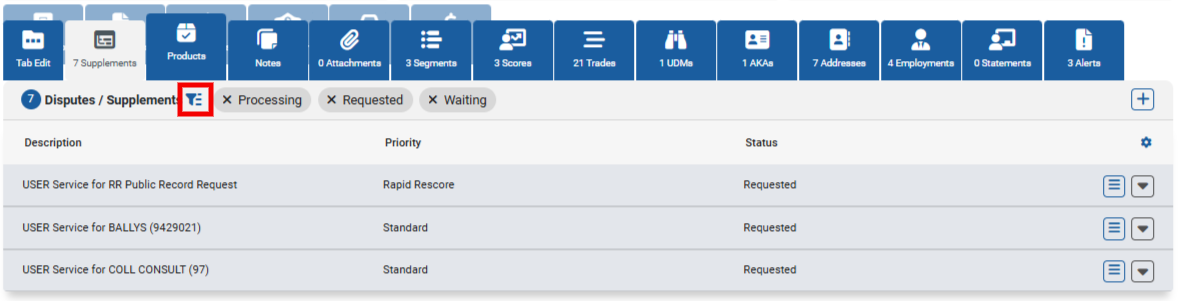
An overlay will display, showing users which filters are currently enabled. These filters are categorized by Status and Priority. 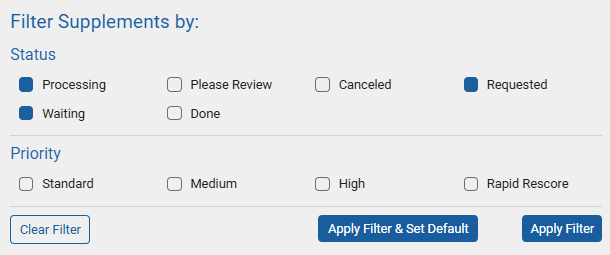
Status
Status options refer to where the file/supplement is in the order's workflow. By default, Processing, Waiting, and Requested will be automatically enabled. Each additional status available is defined as the following:
- Processing: Order is moving through the CRA's workflow.
- Waiting: Awaiting a response from the client or creditor.
- Please Review: Order requires manual intervention before it can be completed.
- Done: Order has been completed.
- Canceled: Order has been canceled.
- Requested: Order has been placed.
Priority
Priority options refer to the importance of the supplement request. Each Priority options is defined as the following:
- Standard: Supplement is being processed in a 'default' manner.
- Medium: Supplement is being processed with a slightly higher than default manner.
- High: Supplement is being processed in a more urgent manner.
- Rapid Rescore: Supplement flagged as a Rapid Rescore.
Apply, Set Defaults, and Clear Filters
When users make changes to the filtering options, those changes must be applied for the update to occur. This can be performed via Apply Filter & Set Default or Apply Filter. 
- Apply Filter & Set Default: Saves the filter settings enabled and retains the filters upon logging in/out of the site. Utilizing this option applies the changes to the user's local device storage. NOTE: filter will need to be adjusted and reset as the default IF they clear their web browser cache.
- Apply Filter: Saves the filter settings enabled during that web browser session.
- Clear Filter: Disables all applied filters.