
XpertOnline offers you the ability to tap into thin file borrower data and deliver it to your clients on your credit reports. Equifax's Telco data (also called NCTUE data) delivers actionable information to support your clients' decisioning when traditional credit information may be lacking or non existent and causing ineligible results from the GSEs.
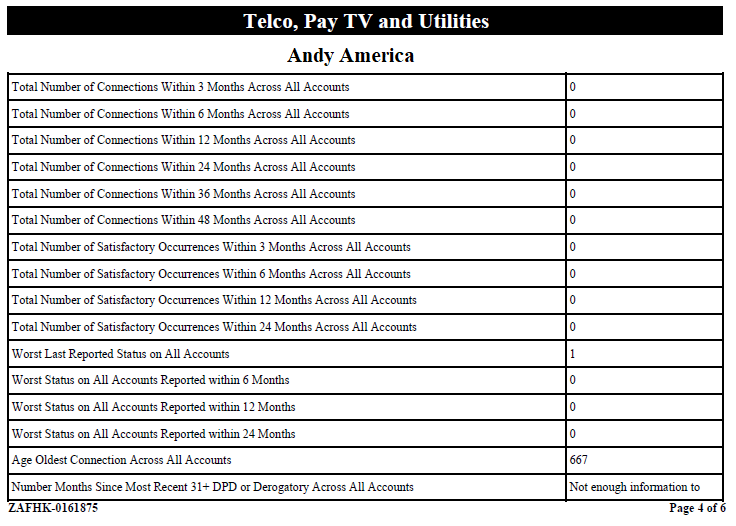
Here is a sample of what the data looks like. See below for a test-file sample full credit report including the Telco data.
Key Benefits:
- Powerful insights that are not typically available via traditional credit reports
- Provide visibility to millions of credit invisible consumers - those without traditional credit files - and enhance the financial profiles of thin file, young and unscorable consumers as they complete first mortgage applications.
- Deliver new attributes that help to automate, save time and resources, and streamline the first mortgage process for applicants – creating more potential for consumers to secure a loan.
Freddie Mac Announcement
Starting June 2026, it's expected that Freddie Mac's LPA system will be accepting the Telco data within the raw bureau data that's sent upon reissue. They will be running their findings on this data soon. Click Here to read the announcement starting at the bottom of page 2: "Expanding Credit Data to Support Mortgage and Lending Innovation."
Setup Step 1: Enable Your EFX Subscriber Codes for Product Code '05769'
Prior to offering Telco data on your credit reports, you will need to contact your Equifax bureau rep and have them enable any subscriber codes to deliver product code 05769. We suggest that this be setup as Keyword Driven, so that if you so choose, you can turn it on or off per client within XpertOnline (see Step 2).
Setup Step 2: Enable Client Products to Request Telco Data
Once you have your subscriber codes updated, you will need to update any products that you'd like to offer the Telco data on within Product Setup in XOP for the appropriate client.
To do this, follow these steps:
- Open XOP and go to the Setup | Clients menu option, then search for the client youd like to offer this to, and once found, move to the Setup tab.
- Click the Lookup Product List button, click OK at the search prompt, then expand the product list and find the product you'd like to enable. Note that the product must have the Equifax v5.0 Credit Report bureau access on it.
- Click the product name you'd like to update, then click the Product Detail button.
- When the product opens, in the Accesses section, expand the Equifax v5.0 Credit Report entry, then click the Addons entry.
- Find the Addon called Telco PayTV and Utilities - Model 05769, then right click and set it to Selected. Then, Save your changes.
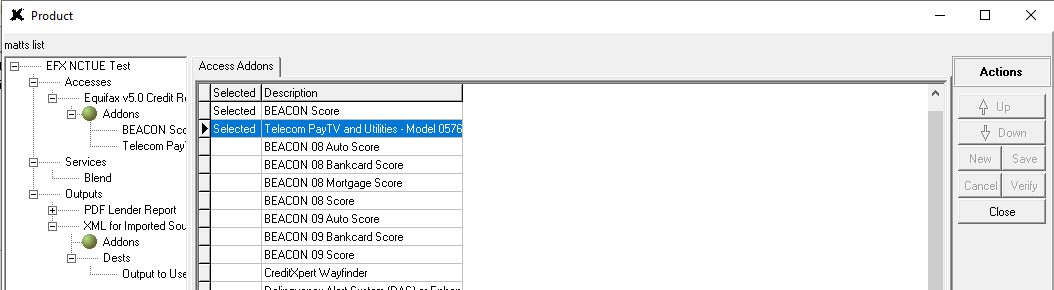
As long as the Equifax subscriber code on this product is enabled, the next time the client orders this product, the Telco / NCTUE data should show if there is a match in the Telco database. If not, there will be a Not Hit in this section.
Output Preview
Click Here to preview an output that includes this data. You can find the Telco data here on pages 4-6.
Here is a sample of how a No Hit would be presented to your clients on your credit reports:
